Know your AWS infrastructure in 10 minutes
Inventory. Architecture. Health. Cost. Automatically discover what runs in your AWS accounts, map how it connects, find what is unhealthy, compare environments and see what everything costs.
Read-only by design. No agents, no write permissions, no infrastructure changes.
- CloudFrontshop.example.com
- Load balancershop-production-alb5xx alarm: 42 > 25
- Target groupshop-production-api-tg
- ECS serviceshop-production-api
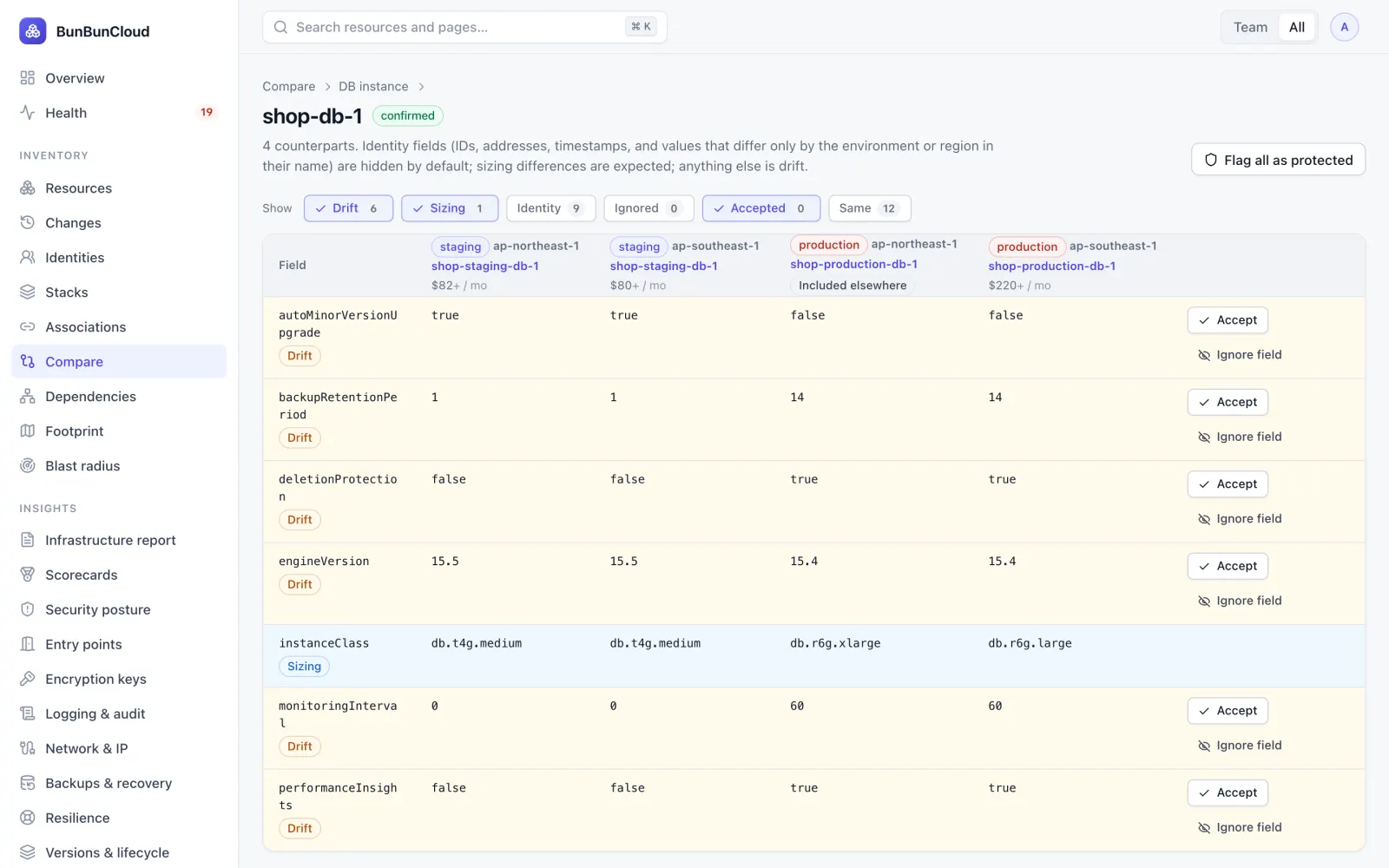
- Aurora clustershop-production-db5 fields differ from staging
The load balancer's 5xx alarm is over its threshold, and everything behind it is healthy: start there.
The database differs from staging in 5 fields, from engine version to deletion protection.
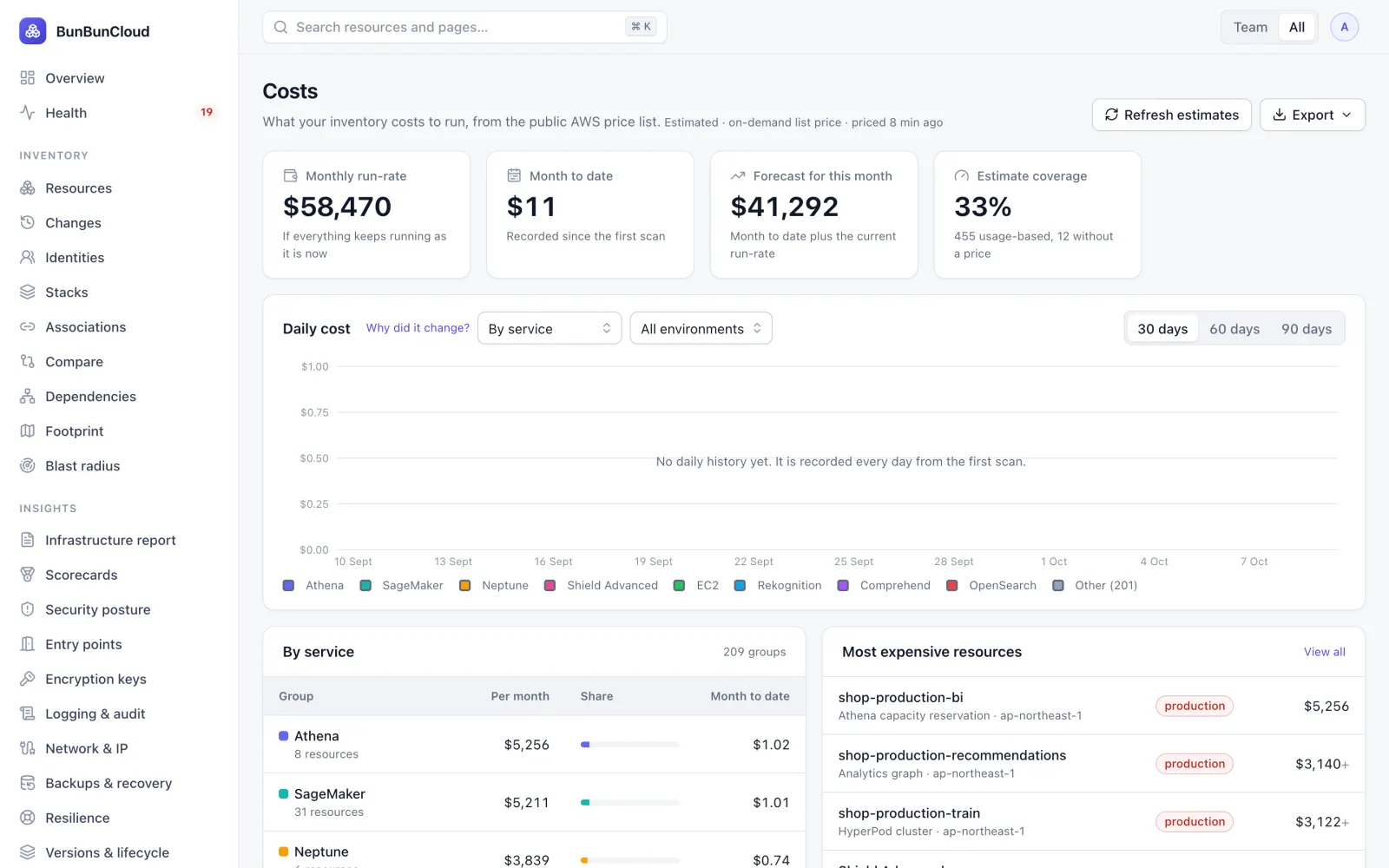
Production in this region runs at about $44,800 a month, estimated resource by resource.
Built for your role
Four questions, answered from one place
For SRE and platform teams whose AWS has grown too complex to understand from the console alone.
See everything
An accurate, always-current map of your AWS infrastructure across accounts and regions, drawn with the regions, VPCs and subnets around each resource.
- Every account and region, over 500 resource types
- Blast radius before you change something
- Which resources Terraform manages, and which were made by hand
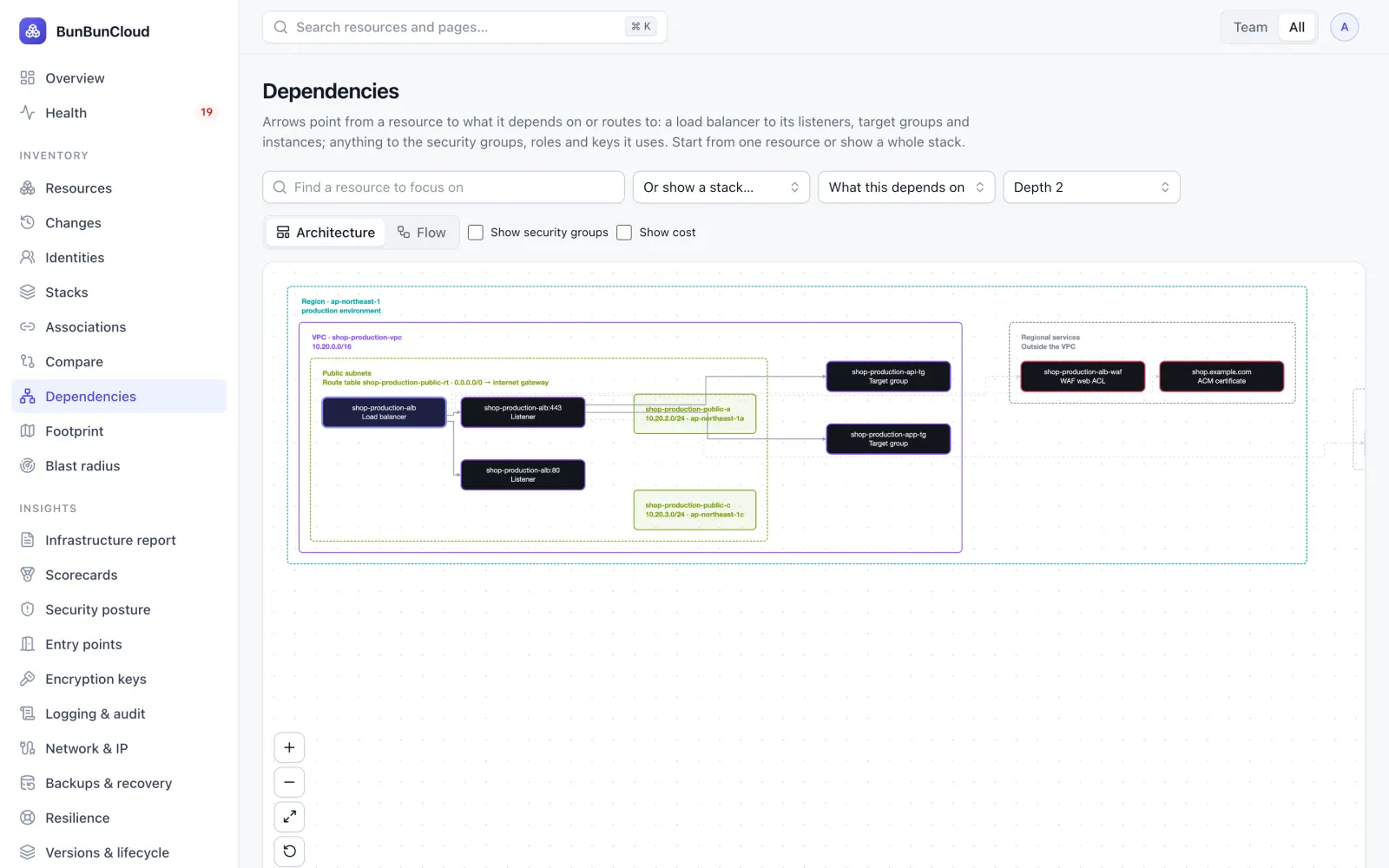
Find problems
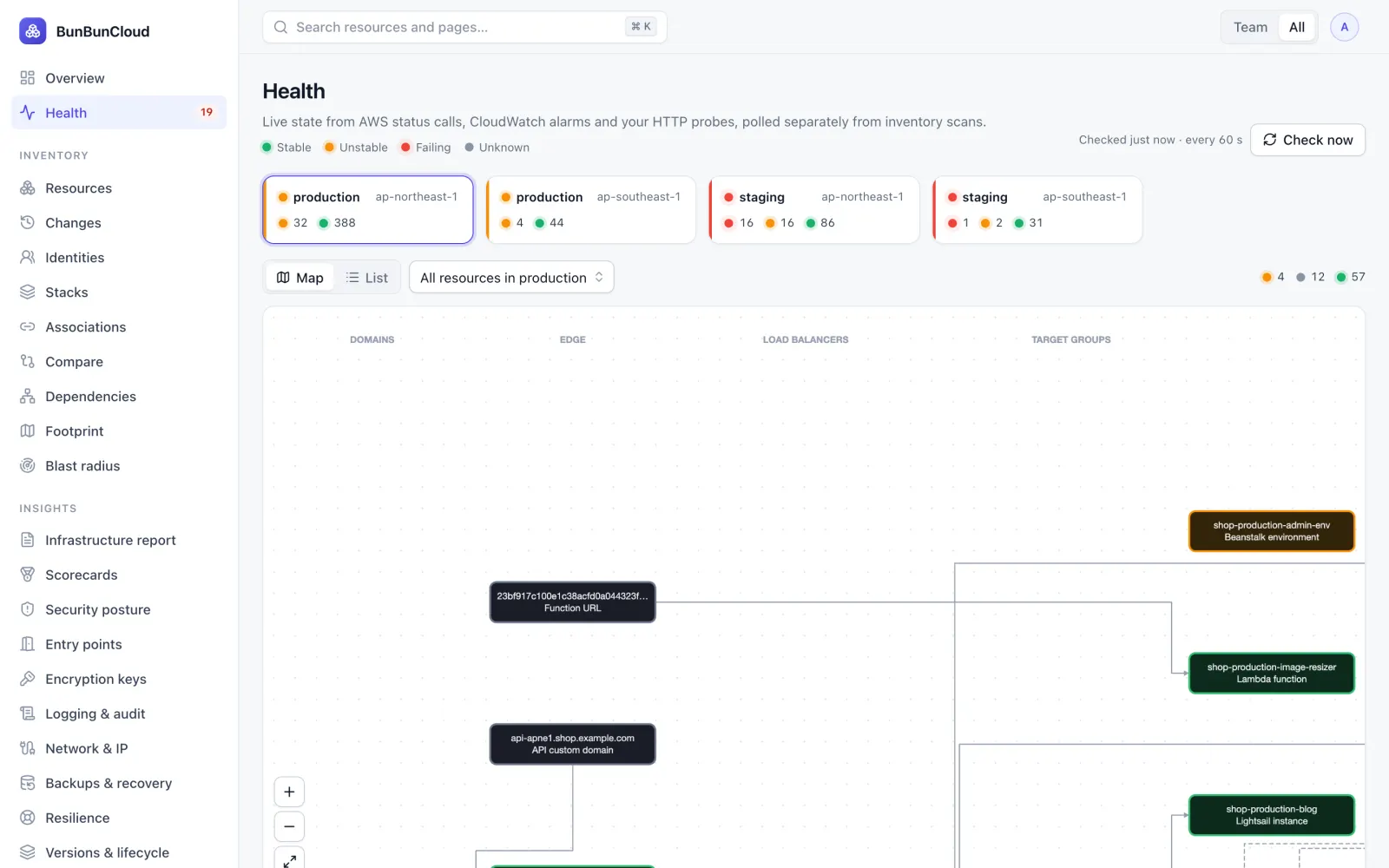
Follow dependencies from the user request to the failing resource. Live health every minute from AWS status, CloudWatch alarms and your own probes.
- A map from DNS and CDN to databases and queues
- Unstable and failing resources, with what each reports
- Monitors, SLOs and incidents per team
Catch drift
Compare staging and production field by field. Identity fields and expected sizing differences are set aside, so what remains is the drift that matters.
- Counterparts across environments suggested for you
- Accept intended differences once
- Security findings: exposed, unencrypted, over-privileged
Understand cost
The estimated running cost of every resource, by service, team and environment, and a ranked list of savings with the effort each one takes.
- Cost per team (showback) and what changed
- Idle and orphaned resources, unused commitments
- Budgets and forecasts
One page for everyone
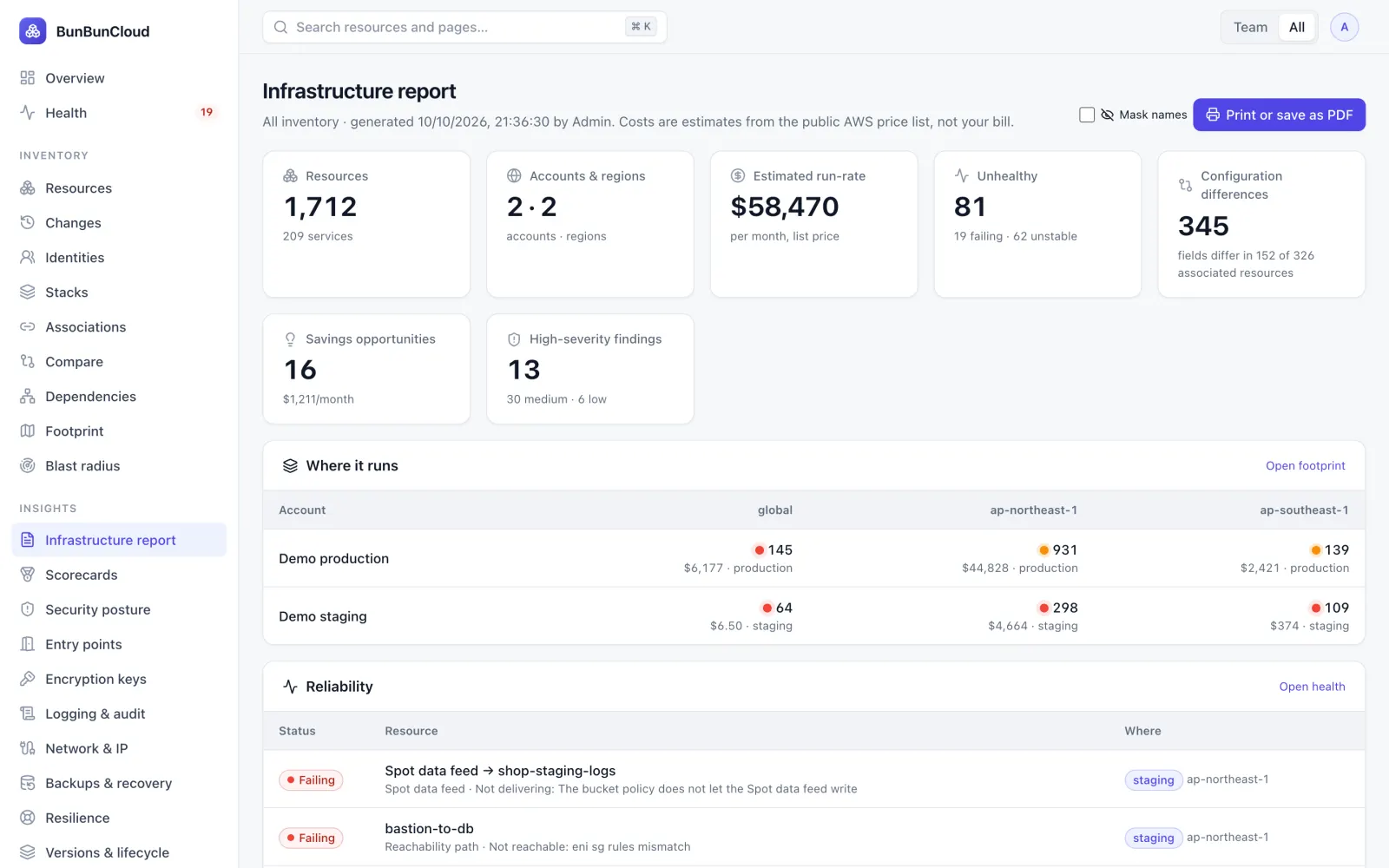
Resources, health, drift, top costs and savings on one printable page. Mask names before you share it outside the company.
- Print or save as PDF
- Same numbers as the live pages
- The deliverable of the free assessment
The same week, with and without BunBunCloud
| Task | Without | With BunBunCloud |
|---|---|---|
| Knowing what exists | Console tabs per account and region, and a spreadsheet nobody trusts | One inventory across every account and region, updated by scheduled scans |
| Something broke | Guess, then click through service after service | Follow the request path to the red component, with what it reports |
| Staging vs production | Find out in production | Field-by-field drift before you release |
| Who owns this? | Ask in Slack and wait | Owner and team on every resource; unowned ones listed |
| The bill grew | Wait for the invoice and dig | Estimated run-rate per resource, team and environment, with what changed and what to save |
| A new engineer joins | Old diagrams and Slack threads | The living architecture diagram of what actually runs |
| Access | Broad credentials or agents on every host | One read-only role per account, no agents |
Built for the people who run AWS
One inventory, four ways of looking at it.
CTO / VP Engineering
“How much complexity and cost are we carrying?”
- The infrastructure report, for the whole estate or one team
- Scorecards per team: security, backups, resilience, cost hygiene
- Estimated cost per team (showback)
Platform & SRE leads
“What is wrong, and what depends on it?”
- Health map and request paths
- Blast radius before a change
- Drift between staging and production
Security
“What is exposed?”
- Posture findings with what to do
- Every entry point from the internet
- Keys, certificates and logging coverage
FinOps & finance
“Why did AWS cost more this month?”
- What changed, resource by resource
- Savings, idle and orphaned resources
- Reservation and Savings Plan coverage, budgets
We never modify AWS resources, tags, configurations or deployments
No agents. No write permissions. You create the role, and you can revoke it at any time.
Create a role
A dedicated IAM role in each account, from a CloudFormation template we generate.
Attach the policy
List, Describe and Get calls only. Review every action before you deploy it.
Connect
Paste the role ARN. For many accounts, deploy the template as a StackSet.
Inspect
The first scan fills in inventory, health, drift and cost. Nothing is installed.
When AWS has grown organically
Platform, SRE and infrastructure teams at SaaS and tech companies with 20 to 500 engineers, where AWS has grown organically: several accounts, staging and production, more than one region, ECS or EKS, RDS, Lambda and CloudFront.
Use cases →Sound familiar?
- Nobody has a complete picture of what exists anymore
- When production is degraded, tracing the chain takes an hour of console tabs
- Staging and production have quietly drifted apart
- The AWS bill grew and no one can say which resources drove it
- New engineers learn production from old diagrams and Slack threads
Your infrastructure report in 10 minutes
Connect a read-only role and get a one-page report: resources, accounts and regions, unhealthy resources, configuration differences, estimated monthly run-rate, largest cost drivers and savings. Print it or share it as a PDF.
Run a free AWS assessment
Know your AWS infrastructure in 10 minutes
Connect a read-only role. Get the infrastructure report: what you run, what is unhealthy, where environments differ and what it costs. Free, no commitment.